


Bulldog Blocker AI Porn Filter
4.31.38K Reviews
App Specs
- Version
- 12.43.239-Aug-2026
- Updated On
- License
- Free
- Downloads
- 500,000+
- Developer
- Ever Accountable
- Categories
- Lifestyle
- Platform
- Android
Screenshots



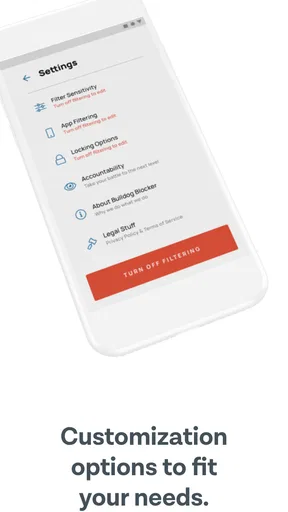
 Analysis by AppCompare
I think a device-wide adult-content filter is most useful when it adds a deliberate pause between an impulse and a page, rather than promising that nothing questionable can ever appear. Bulldog Blocker AI Porn Filter is aimed at that practical role: it uses AI to identify material it considers explicit and block access. That makes it worth considering for someone who wants a firmer boundary across everyday browsing, though I’d treat it as one layer of protection, not a substitute for supervision or personal judgment.
Who benefits from a filter across the device
The appeal is broader than family use. A parent may want a child’s phone to have a consistent barrier, while an adult might prefer fewer chances to drift into content they are trying to avoid. In either case, a filter that works beyond a single browser can be more convenient than maintaining a separate block list in each app. That convenience matters most when a device is used for searching, social feeds, and ordinary web browsing throughout the day.
A realistic example is a parent handing a phone to a child to look up a school topic. The search may lead to image results or unfamiliar pages, so having a filter running in the background can reduce the chance of an accidental encounter. It does not remove the need to talk about what to do if something slips through; it gives the family a practical starting point for that conversation.
What AI filtering can and cannot promise
AI-based screening is useful because adult material does not always sit neatly behind a known website address. Images, ads, and newly encountered pages can make simple lists less dependable. Still, automated judgment has a trade-off: context can be difficult to interpret. A health article, art reference, or educational image may look sensitive to a filter, while an unsuitable item may evade it. I would test the level of restriction against the way the device is actually used, especially if it is shared for school or work.
That is also why a blocked-page experience should be treated as a prompt to review settings, not proof that the app has understood every situation correctly. If legitimate material is interrupted, adjust the configuration where possible and check whether the same issue repeats. If a questionable item gets through, use the reporting option described in the app rather than assuming the filter will learn from an unreported incident.
Choosing it over simpler controls
Built-in parental controls are often the sensible first stop when the goal is limiting a child’s screen time, managing downloads, or restricting broad content categories. A browser’s own safe-search setting can also help when browsing is mostly limited to one search tool. Bulldog Blocker is more relevant when the priority is specifically reducing exposure to adult content across a device and the user wants a dedicated filtering tool.
These approaches need not be competitors. A parent can combine a content filter with the operating system’s family settings, using each for a different job. For an adult setting a personal boundary, a system-level restriction or a browser setting may be enough if the need is narrow; a dedicated filter makes more sense when those controls feel too easy to bypass or do not cover the person’s usual browsing habits. The right choice depends on the boundary you want, not on which option sounds most powerful.
Worth Reading Before You Choose

EA SPORTS FC Mobile 26 Is a Bigger Football Game, but It Takes Time

Flipboard Shows What News Apps Must Do Beyond the Feed

Switching to Android Auto Means Rethinking Your Driving Routine

Google Calendar Makes a Crowded Week Easier to Manage

Ludo King Makes the Most of the Minutes Between Plans

Baby Panda World Brings Quick Play to Modern Phones, but Its Game Library Feels Busy
There is a small but important setup habit I recommend: decide in advance who will manage the settings and what to do if access is blocked by mistake. For a family device, that can prevent a child from being left to troubleshoot a restriction alone. For personal use, it helps make the barrier intentional rather than a setting that gets disabled in frustration the first time a useful page is caught.
Getting Started with Bulldog Blocker
First off, installing Bulldog Blocker AI Porn Filter is a breeze. Available for both Android and iOS, it’s just a quick download from your app store. Once you’ve got it, setting it up is pretty straightforward. The app guides you through a simple setup process, and before you know it, you’re all set to surf the web without the worry of stumbling onto explicit content.
How Does It Work?
The magic behind Bulldog Blocker lies in its AI technology. It’s like having a vigilant watchdog that constantly scans your browsing activities. The AI is designed to recognize and block adult content in real-time. What’s impressive is its ability to adapt and learn, improving its filtering capabilities over time. You can customize the sensitivity levels, giving you control over what gets through and what doesn’t.
User Interface and Experience
Let’s talk about the user interface. It’s clean, intuitive, and doesn’t feel cluttered. The dashboard gives you a quick overview of the app’s performance, showing you how many sites have been blocked. Navigating through the settings is a breeze, and even if you’re not tech-savvy, you won’t find yourself lost.
I also appreciated the app’s unobtrusiveness. Once it’s running, it quietly does its job without popping up annoying notifications every few minutes. It’s like having a silent guardian watching over your browsing activities.
Performance and Reliability
So, how well does it actually work? During my test, Bulldog Blocker did a commendable job. It successfully blocked access to several adult sites and flagged inappropriate images. The AI's filtering mechanism is quite robust, and I didn’t notice any significant lag in browsing speed.
However, like any AI-based solution, it’s not 100% foolproof. Occasionally, a few inappropriate ads managed to sneak through, but those instances were rare. The app also allows you to manually report such content, which helps improve its future performance.
Everyday setup and maintenance
For a shared device, I’d set aside a few minutes at the beginning to decide whether the filter should be strict or more flexible. A tighter setting may suit a child’s general browsing, but it can also catch legitimate material; a looser one may feel less disruptive while offering a weaker boundary. The practical test is not whether the setting sounds right, but whether it blocks the kinds of pages the user wants to avoid without repeatedly interrupting normal tasks.
It is also worth revisiting the setup after a change in routine. A phone used mostly for casual browsing may need a different balance from one used for homework, health research, or work. Rather than changing settings every time a page is blocked, look for a pattern: if the same kind of useful resource is affected, adjust once and check the result over the following days. This is more manageable than treating every individual block as a separate problem.
One reader question is whether the filter should be trusted to handle a child’s internet access on its own. I wouldn’t use it that way. Filtering can reduce accidental exposure, but it cannot replace age-appropriate conversations, device rules, or an adult checking in. A parent who needs control over screen time, app installs, or a child’s broader device activity should pair it with the relevant family controls rather than expect a content blocker to cover those separate needs.
Why You Might Love It
If you’re a parent, this app is a godsend. It provides peace of mind knowing your kids can explore the internet safely. For individuals who want to avoid adult content for personal reasons, Bulldog Blocker is a great companion. It’s also helpful in work environments where maintaining professional standards is crucial.
Where the trade-offs show up
The main compromise with any content filter is that it can be both too strict and not strict enough. A page may be blocked because an image or phrase resembles explicit material, while an ad or unfamiliar source may still get through. That means I would not choose this as the sole safeguard for a child who needs carefully managed access, and I would not promise a user that it will remove every possible trigger. Its value is in making unwanted material harder to reach, not in creating a flawless wall.
There is another practical question: will it interfere with normal browsing? The app’s unobtrusive design helps, but any filter can interrupt a legitimate page if it misclassifies content. If uninterrupted access to a wide range of visual or medical material is essential, a narrower browser-level setting may be less frustrating. Someone who wants a stronger, device-wide boundary may reasonably accept a few extra checks in exchange for broader coverage.
The app is free to download, but full access requires a subscription, with in-app purchases ranging from $2.99 to $149.99 per item. I’d compare the plan options inside the app with how often and on how many devices you expect to use it before committing. The range means it is sensible to check the selected term and renewal details carefully; don’t assume that “free” means every protection feature remains available without payment.
Bulldog Blocker is a lifestyle app from Ever Accountable. It has an average rating of 4.4 from around 23,000 ratings, and more than 500,000 installs. The Everyone age rating makes the app itself suitable for a broad audience, but that should not be confused with a guarantee that all browsing on a device will be appropriate for every age. It was released on July 6, 2020, and version 12.27.213-Jan-2026 is the current version. I’d keep it updated, as the earlier version can miss improvements that arrive in later releases.
A sensible fit, not a universal answer
I’d recommend trying it if your main concern is reducing exposure to adult content across regular device use and you are comfortable reviewing occasional blocks. It is a better fit for adults creating a personal safeguard, or families who want a dedicated layer alongside supervision, than for anyone expecting a filter to make independent decisions about a child’s online life.
I would skip it if your needs are limited to one browser and its built-in controls already do the job, or if even occasional false blocks would make the tool unusable for you. People who need detailed management of screen time and apps should look first at broader parental-control tools; people who want only safer search results may prefer configuring safe search. The dedicated filter is most compelling when the specific issue is adult-content exposure, rather than general device management.
A Few Things to Keep in Mind
While Bulldog Blocker is largely effective, remember that no filter is perfect. It’s always a good idea to combine it with other parental controls for a comprehensive safety net. Additionally, keep the app updated to benefit from the latest improvements in its AI technology.
On the downside, the app does require a subscription for full access to its features. But considering the protection it offers, it’s a worthy investment for many users.
Overall, Bulldog Blocker AI Porn Filter offers a solid solution for anyone keen on maintaining a family-friendly browsing environment. It’s easy to use, effective, and backed by smart technology. Whether you’re a concerned parent or just someone looking to steer clear of explicit content, it’s definitely worth checking out. Give it a try and see how it can make your online experience safer and more pleasant.
Pros
- Effective real-time filtering capabilities.
- User-friendly interface with easy setup.
- Customizable settings for different users.
- Low impact on device performance.
- Regular updates for enhanced protection.
Cons
- Occasional false positives in filtering.
- Limited language support.
- Requires constant internet connection.
- Some features behind paywall.
- No desktop version available.
FAQs for Bulldog Blocker AI Porn Filter
What is Bulldog Blocker AI Porn Filter and how does it work?
Bulldog Blocker AI Porn Filter is an application designed to help users control and filter explicit content on their devices. It uses advanced AI algorithms to detect and block pornographic material across websites and apps, ensuring a safer browsing experience. The filter can be customized to suit different age groups and preferences, making it versatile for family use.
Is Bulldog Blocker AI Porn Filter compatible with both Android and iOS devices?
Yes, Bulldog Blocker AI Porn Filter is compatible with both Android and iOS platforms. The app is designed to integrate seamlessly with various devices, providing comprehensive protection across smartphones and tablets. Users can download the app from the Google Play Store for Android devices and the Apple App Store for iOS devices.
How effective is the Bulldog Blocker AI Porn Filter in blocking explicit content?
The Bulldog Blocker AI Porn Filter is highly effective due to its advanced AI technology that continuously learns and updates its database. It accurately identifies and blocks a wide range of explicit content, minimizing false positives. Additionally, the app provides regular updates to improve its filtering capabilities, ensuring users have updated protection.
Can Bulldog Blocker AI Porn Filter be customized for different users or age groups?
Yes, the app offers customization options allowing users to tailor the filter settings based on different age groups and individual preferences. This feature makes it ideal for families, as parents can set specific restrictions for children while maintaining more relaxed settings for adults, all within the same application.
Are there any subscription fees or in-app purchases associated with Bulldog Blocker AI Porn Filter?
Bulldog Blocker AI Porn Filter may offer different pricing models depending on the level of service. While some basic features might be available for free, advanced features and enhanced protection often require a subscription. Users should check the app’s pricing details on the respective app store for accurate information on any fees or in-app purchases.


